Inventory and stock
Showing stock levels builds trust and a little urgency. “Only 3 left” tells customers to decide now, and “In stock” tells them it’ll ship.
Stock levels show in two places, and both use the threshold and colors in Theme settings > Inventory.
- Product pages: add the Inventory status block to Product information.
- Product cards: set Show product inventory in Product cards to For low stock or For all stock.
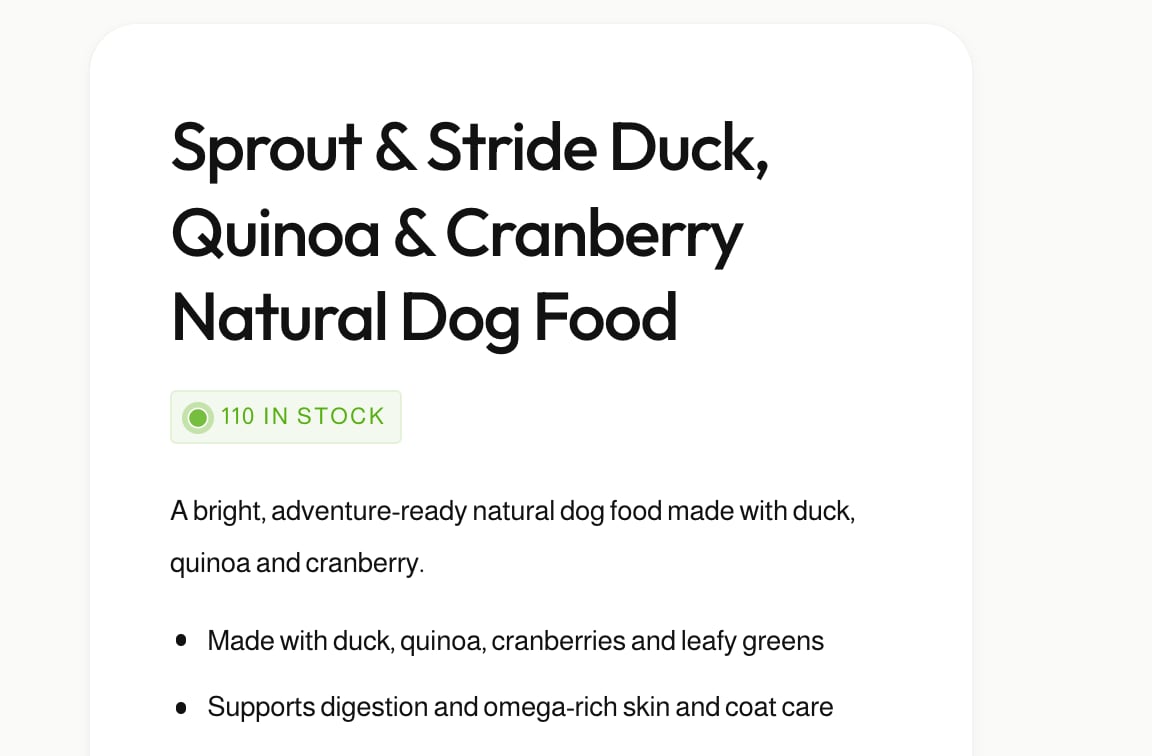
The low stock threshold
Low inventory threshold, from 0 to 100, is the point where “In stock” becomes “Low stock”. The default is 10. With 10, a product with 8 left shows as low stock, and one with 12 shows as in stock.
Set it to 0 to never show low stock, so customers see “In stock” whenever the product is available.
What customers see
| Stock | Message | Color setting |
|---|---|---|
| Above the threshold | In stock, or “110 in stock” with the count | In stock color |
| At or below the threshold | Low stock, or “Low stock! Only 3 left” with the count | Low stock color |
| None, but continuing to sell | Awaiting stock, shipping soon | Out of stock - continue selling color |
| None | Out of stock | Out of stock color |
On the product page, the Inventory status block can show the count or hide it with Show inventory count, and appear as a badge or as plain text with Show as a badge. It updates when customers choose a different variant.
Stock must be tracked
Ignite can only show stock levels for products where Shopify tracks the quantity. Turn on Track quantity on each product or variant in your Shopify admin.
Related features
- Back-in-stock alert: let customers ask to hear when a product returns.
- Flash sales: show how much stock has gone during a sale.
- Sold-out products: choose what the quick add button does when nothing is left.
Common questions
How do I show “Only X left” on my Shopify product pages?
Add the Inventory status block to the product page and set Theme settings > Inventory > Low inventory threshold. When stock is at or below that number, the block shows a low stock message.
Why isn’t the stock level showing?
Shopify must be tracking inventory for the product. Check Track quantity on the product or variant in your Shopify admin.
What do customers see when a product is out of stock but still selling?
If the product continues selling when out of stock, they see “Awaiting stock, shipping soon”, in the Out of stock - continue selling color.