Breadcrumbs
Breadcrumbs show customers where they are, such as Home › Phones › Pixa 9, and let them step back to a broader page in one click. They also help search engines understand your store.

Show breadcrumbs
Breadcrumbs are a section, so you turn them on or off per template, such as product, collection, blog, article, page, search and cart.
- In the theme editor, open the template, such as Products > Default product.
- Find the Breadcrumbs section and click the eye icon to show or hide it.
- Click Save.
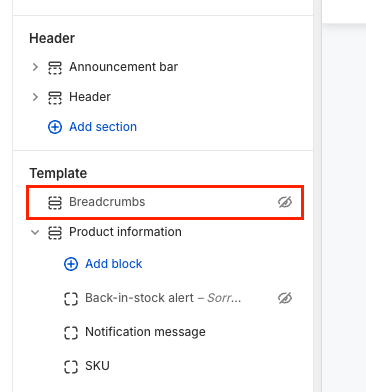
The style is set in Theme settings > Breadcrumbs: the home icon, text size, weight, capitalization and spacing. Truncate the current page breadcrumb shortens long product names after 4, 7 or 10 words.
Show the collection a product came from
When a customer opens a product from a collection, the breadcrumb can include that collection.
- Go to Theme settings > Product cards.
- Turn on Include collection in product link.
- Click Save.
Product links now include the collection, which tells the theme which collection to show.
Custom breadcrumbs for a product
For full control, set the trail for a product yourself with a metafield. This suits products that belong in a particular place, whatever route the customer took.
- In your Shopify admin, go to Settings > Metafields and metaobjects > Products and click Add definition.
- Name it
Breadcrumbsand make sure the namespace and key iscustom.breadcrumbs. - Set the type to Collection and choose List of collections, then save.
- Open a product and add collections to the metafield, in the order they should appear.
custom.breadcrumbs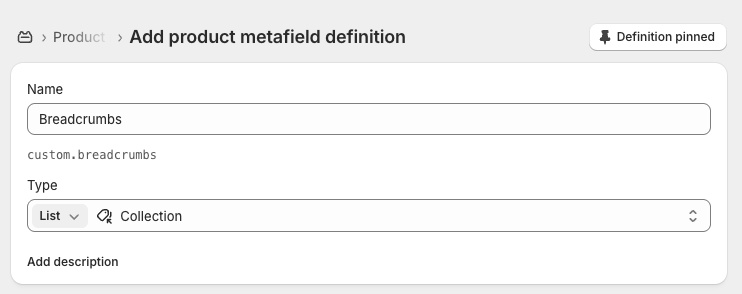


Show custom product breadcrumbs in Theme settings > Breadcrumbs must be on, which it is by default.
Breadcrumbs and search engines
Ignite adds breadcrumb structured data, which search engines can show in results instead of a plain web address. You can turn it off in Theme settings > SEO, GEO & Speed with Add schema to breadcrumbs.