Cart and cart drawer
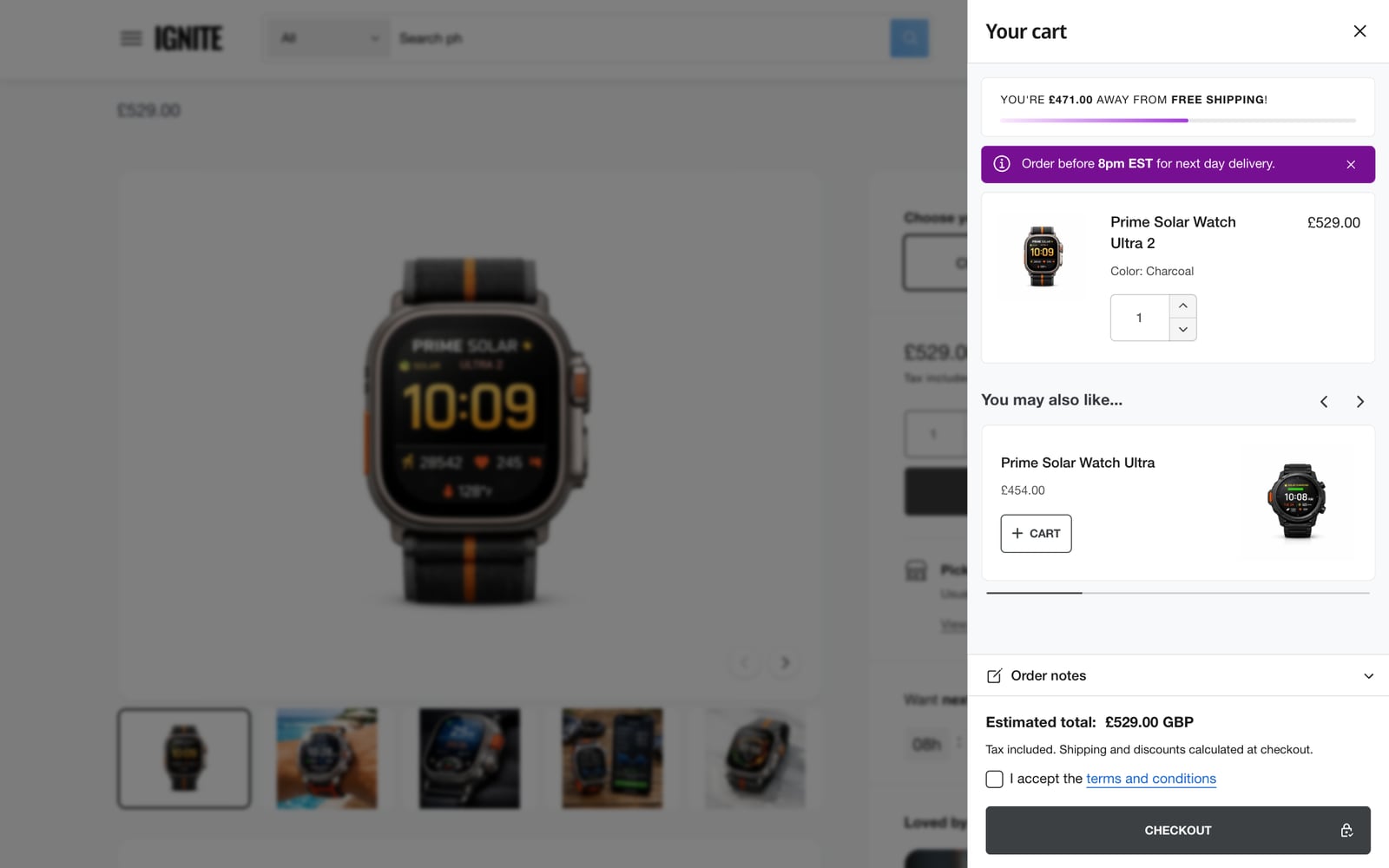
The cart is the last step before checkout, so it should be quick and reassuring. Ignite’s cart drawer slides in from the side, shows how close customers are to free shipping, and suggests something to add.
Find these in the theme editor under Theme settings > Cart/Cart drawer. Most settings apply to both the cart drawer and the cart page.
What happens after adding to cart
After adding to cart sets what customers see when they add a product:
| Option | Best for |
|---|---|
| Open cart drawer | Most stores. Customers see their cart and can keep shopping or check out. Enable cart drawer must be on. |
| Go to cart page | Stores where customers usually buy one item, or apps that only work on the cart page. |
| Show popup notification | A lighter confirmation that doesn’t cover the page. |
| Do nothing | Stores where customers add many items in a row, such as with a bulk order list. The cart icon still updates. |
Cart drawer settings
- Cart icon: a cart, bag or basket in the header.
- Cart drawer checkout buttons: Checkout, View cart, or both. View cart sends everyone through the cart page, which some apps need.
- Scroll entire cart drawer: lets the whole drawer scroll on mobile, desktop or both, which leaves more room for products.
Free shipping bar
The bar tells customers how much more they need to spend for free shipping, and fills up as they add to their cart. It shows in the cart drawer and on the cart page.
- Turn on Show free shipping bar.
- In Free shipping minimum amounts, add one line per currency: the currency code, a colon and the amount.
- Edit the three messages if you like.
[amount]is replaced with how much is left to spend. - Click Save.
USD:100
GBP:80
CA:CAD:150
CAD:120
To set a different minimum for one country, start the line with its two-letter country code, as in CA:CAD:150. Put lines with country codes above the lines without them.
- Below 60% of the minimum, customers see the Standard message.
- From 60%, they see the Message when close to free shipping.
- Once they reach it, they see the Message when shipping is free.
If a customer shops in a currency that has no line, the bar is hidden for them.
Related products
With Enable related products on, the cart suggests products that go well with the last item added. They come from Shopify’s product recommendations, which learn from your orders and improve over time. Choose a carousel or a stack, how many to show (2 to 10), the heading, and whether they also appear in the popup notification.
What the cart shows
| Setting | What it does |
|---|---|
| Show order notes | A box for customers to leave a note with their order. |
| Show tax message | A line explaining whether tax and shipping are included. |
| Show product vendor, subtitle and SKU | Extra detail on each item. |
| Terms and conditions | Link to your terms page, and customers must tick a box to accept them before checking out. |
| Continue shopping link | Where the “Continue shopping” link goes. It defaults to your collections page. |
Promo and custom message
These two only appear in the cart drawer.
- Cart drawer promo: an image with text and a link, shown only when the cart is empty. Use it to point customers at a bestseller or a sale, so an empty drawer still leads somewhere.
- Custom message: a short message with an icon, such as a dispatch cut-off. Choose how many items must be in the cart before it shows, whether it shows on mobile, desktop or both, and whether customers can close it.
Shipping rates calculator
Turn on Show shipping rates calculator to let customers check delivery costs before checkout. The country list only includes countries in your shipping zones. Fallback country is used when the customer’s country can’t be detected automatically.
Colors
Background color scheme and Foreground color scheme set the colors of the cart drawer and the popup notification. The cart page has its own color schemes in the Cart section of the cart template. See Color schemes.
Common questions
How do I add a free shipping bar to my Shopify cart in Ignite?
Go to Theme settings > Cart/Cart drawer, turn on Show free shipping bar, and add a line such as USD:100 to Free shipping minimum amounts for each currency you sell in.
Does the free shipping bar make shipping free?
No. The bar is only a message. Create the free shipping rate itself in your Shopify admin under Settings > Shipping and delivery, with the same minimum.
Why isn’t the free shipping bar showing?
There’s no line for the customer’s currency. The bar only shows when Free shipping minimum amounts has a line for the currency they’re shopping in.
Can I make customers accept terms and conditions before checkout?
Yes. Set Terms and conditions to the page with your terms. A checkbox then appears in the cart, and customers must tick it before they can check out.